Bow-Tie Risk Assessment in Aviation: A Complete Maintenance Example
A full bow-tie for a tool left in an engine intake: threats, barriers with owners, consequences, escalation factors, residual risk and SPIs.
Dionysis Kefalas13 min read
On this page
05:40 at ExampleMRO's line station. The end-of-shift tool check comes up one short: kit 14's inspection torch is not on its shadow. Kit 14 was last used for a fan blade inspection on XX-EXA's number 2 engine, and XX-EXA is due off stand at 06:30. Whether that torch is found was settled months ago, by the barriers around one hazard.
A bow-tie risk assessment draws those barriers. It maps one hazard around a single top event: the moment control is lost. Threats that can cause it sit on the left, consequences on the right. Preventive barriers stop threats; recovery barriers stop or limit consequences. Escalation factors weaken barriers and get barriers of their own. To build one, name the hazard, fix the top event, list threats and consequences, place barriers on every line, judge each barrier, score the current risk, then add barriers and forecast the residual risk.
What goes into a bow-tie
Read it left to right, as time. Left of the knot is prevention. Right of it assumes prevention has already failed.
Does EASA require a bow-tie?
No. The rules require the work, not the method. Part-145 point 145.A.200 asks for a management system that includes, at (a)(3):
the identification of aviation safety hazards entailed by the activities of the organisation, their evaluation and the management of the associated risks, including taking actions to mitigate the risks and verify their effectiveness
That text names no bow-tie and no risk matrix. Two EASA user guides, one for foreign Part-145 expositions and one for CAMEs, mention the bow-tie as one option among several: "Regardless of the method used (ICAO safety risk matrix, ARMS, BOW-TIE, etc.), it is important to customize the risk assessment matrix so as to reflect the operational profile." A user guide is not rule text. The hazard identification and safety risk management guide sets out the rules and AMC themselves.
For a bow-tie, the end of that text matters most: the mitigating actions are barriers, and verifying their effectiveness is the barrier judgement and the SPIs below.
The worked example: a tool left in an engine intake
ExampleMRO maintains narrow-body jets for ExampleAir and other operators. Fan blade inspections and probe changes put spanners, torches and mirrors inside an intake most weeks. ExampleMRO is fictional, and so are its counts, verdicts, severities and likelihoods below: copy the structure, then score with your own data and definitions.
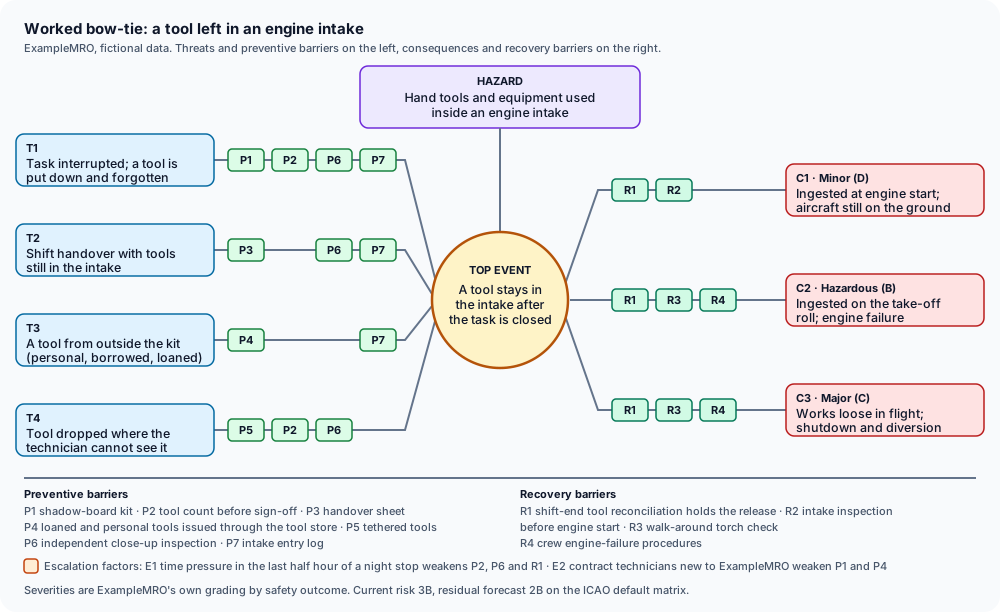
The whole bow-tie on one page. The steps below build it line by line.
Step 1: fix the hazard and the top event
- Hazard: hand tools and equipment used inside an engine intake.
- Top event: a tool or item of equipment stays in the intake after the task is closed.
While someone is still working in the intake, the tool is under control. Once the task card is signed, only a later check stands between the tool and a running engine. "Engine damage" would be too late for a top event; it is a consequence. "Tools in the intake" is too early; that is the hazard during normal work.
Step 2: threats and preventive barriers
Each threat must be able to cause the top event on its own. Barriers sit on the threat lines they interrupt, and one barrier can sit on several.
Step 3: consequences and recovery barriers
Severity is the worst credible outcome on each line, using ExampleMRO's own severity definitions. ExampleMRO grades severity by the safety outcome for people and the flight, not by repair cost, so an engine damaged on the ground with nobody hurt is Minor even when the repair bill is large. If your definitions count major equipment damage as Hazardous, as the ICAO wording does, C1 scores higher; the top score still rests on C2.
R3 and R4 belong to ExampleAir. They are interface barriers: ExampleMRO can ask for evidence that they work but does not run them. R4 is also mitigating; it limits what follows an engine failure.
Step 4: escalation factors and their barriers
An escalation factor does not cause the top event. It makes a barrier fail.
How to judge whether a barrier is any good
Ask four questions of every barrier:
- Does it work on its own? A barrier detects, decides and acts. If it cannot stop the sequence alone, it is not a barrier.
- Is it independent? Of the threat, and of the other barriers on its line. P2 and P6 fail together if one tired technician does both at 05:30, which is why P6 needs a second person.
- Is it effective? How often it works when called on, shown by spot checks, lost-tool reports and audit samples, not opinion.
- Who owns it? A named role that keeps it working and hears when it degrades. "All staff" is not an owner.
ExampleMRO's barrier register today:
The R1 row is the one to read twice. The reconciliation only sees tools on a shadow board. A torch a technician brought from home was never on one, so the 05:40 check has nothing to miss. T3 runs straight past R1.
Current risk and residual risk
Current risk credits only barriers that exist and work today. ExampleMRO scores the bow-tie on its worst credible consequence, C2 at Hazardous (B). The top event has happened once in twelve months: the kit 14 torch, caught by R1. The T3 path bypasses R1 entirely, which leaves R3, a barrier ExampleMRO cannot see into, as the last line before take-off. ExampleMRO calls that Remote (3). Current risk: 3B.
The planned barriers close P4 for loaned tools, add P5 and P7 to every intake task, add a tools line to P3, and put the two escalation-factor barriers in place. If they are implemented and work, likelihood drops to Improbable (2). Severity stays at B: preventive barriers change how often a tool stays behind, not what a spanner does to a fan at take-off power. Residual risk forecast: 2B.
On the ICAO Doc 9859 default matrix, 3B and 2B both sit in the tolerable band. The cell moved; the colour did not. That shows what a matrix cannot do: decide whether 2B is acceptable to ExampleMRO. AMC1 145.A.200(a)(3) puts that decision with specified levels of management:
(2) The levels of management who have the authority to make decisions regarding the tolerability of safety risks, in accordance with (b)(1)(ii), should be specified.
The residual score stays a forecast until the new barriers exist and prove themselves. Scoring detail, including worst credible versus worst imaginable outcomes, is in the risk matrix article.
Turning weak barriers into leading SPIs
The bow-tie shows which barriers carry the load; an SPI shows whether they still do. Measure the barrier, not the accident. Tool-caused engine failures are too rare to steer by. Skipped reconciliations are not.
Lost-tool reports per 1,000 task cards show how often the recovery side is called on. Set targets and alert levels once you have a baseline; the SPI worked example shows how. The same four barriers belong on the next internal audit checklist, and the audit programme guide shows where they fit.
Common mistakes
- Barriers that are wishes. "Be careful in the intake", "tool awareness", "follow procedures". Ask what it detects, who owns it and how an auditor would see it fail. No answer means a wish. The barrier is the count, log or tether that makes care happen.
- Threats that are consequences. "FOD ingestion" drawn on the left of "tool left in intake" is an outcome, not a cause. Test: does it happen before the knot?
- Escalation factors drawn as threats. Time pressure leaves no tool in an intake by itself. It makes P2, P6 and R1 fail, so draw it under them.
- Planned barriers in the current risk. Tethers not yet bought do not lower today's score.
- A hazard too broad. "Maintenance error" yields forty threats and no usable barrier. Keep one top event per bow-tie; an unsecured fan cowl on the same engine is a second bow-tie.
For starting points on other hazards, the public SMS hazard library groups sample hazards by SMS domain.
Doing this in Avioverse
In Risks, New assessment offers Create manually or Draft with Metis. One assessment can hold several bow-ties (Add bow-tie), each with five columns: Threats, Preventive barriers, Top event, Recovery barriers and Consequences.
Each barrier is marked existing, planned or in place. You set Current risk and the Residual risk forecast yourself by picking a matrix cell. Current risk credits only existing and in-place barriers; planned ones count only towards the forecast, and the page says so: "Residual risk is a forecast, conditional on planned controls being implemented and effective." A planned barrier can become a task with Create task. When the task is done, the page asks you to confirm the barrier as In place & effective; completing the task alone does not lower the risk.
The band and its colour come from the Workspace risk matrix, a fixed 5×5 whose default bands follow ICAO Doc 9859. Workspace owners and admins can re-band cells and choose band colours; nobody can resize the matrix or rename its axes. A later matrix edit changes the band on saved assessments too, finalised ones included.
Saving (Create assessment, then Save changes) and Finalise are separate steps. Finalising records who finalised the assessment and when, and the confirmation dialog calls a finalised assessment "signed off". It is not a second person's approval, and it is not your organisation's acceptance of the risk. Reopen & edit returns it to draft. The PDF export includes the change history. Avioverse is not your SMS record; the PDF is what you file in it.
An assessment can also start from an audit finding, through Create new in the finding's risk decision. The finding cannot close until that assessment is finalised.
Metis can draft a bow-tie from your description and save it as a draft when you ask. It cannot finalise it.
The grid has no column for escalation factors and no owner field on a barrier, so keep both in your barrier register. SPIs are set up in their own module and do not link to the assessment.
Frequently asked questions
What is a bow-tie risk assessment in aviation?
It maps one hazard around a single top event, the moment control is lost. Threats and the preventive barriers that stop them sit on the left. Consequences and the recovery barriers that stop or limit them sit on the right. Escalation factors show what weakens a barrier.
Does EASA require a bow-tie analysis?
No. Part-145 point 145.A.200 asks for hazard identification, evaluation and risk management, but it names no method. Two EASA user guides mention the bow-tie as one option among several; a user guide is not rule text.
What is the difference between a threat and an escalation factor?
A threat can cause the top event on its own, such as a tool put down in an intake during an interrupted task. An escalation factor causes nothing by itself. It makes a barrier fail more often, such as time pressure at the end of a night shift.
What is the difference between current risk and residual risk?
Current risk credits only the barriers that exist and work today. Residual risk is a forecast that assumes the planned barriers are implemented and effective, so it stays a forecast until they are.
How do bow-tie barriers become SPIs?
Pick the barriers that carry the most load or look weakest, and measure each month whether they work. One example is the share of shifts where the tool reconciliation was complete before the first release.
Does finalising a bow-tie in Avioverse mean the risk is accepted?
No. Finalising records who finalised the assessment and when. It is not a second person's approval, and it is not the organisation's acceptance of the risk. That decision stays with the people your safety management system names.
Related
- Hazard Identification and Safety Risk Management under EASAGuide · 17 min
- Aviation Risk Matrix: Likelihood, Severity and EASAArticle · 12 min
- SPI Alert Levels and Targets: A Worked ExampleArticle · 12 min
- Occurrence Analysis and Follow-up in the SMSGuide · 5 min
- EASA Safety Management AI Prepares the WorkArticle · 10 min
Written by Dionysis Kefalas. Retired Hellenic Air Force Captain and founder of Avioverse. About the author
Build the bow-tie by hand or have Metis prepare a first draft, score it on your workspace matrix, and finalise it yourself when you are satisfied. Opens in October 2026.